zerouter provider docs
Connect official resources. Earn and withdraw automatically.
zerouter routes API requests to verified provider resources without exposing provider credentials. Successful requests are metered and written to the server ledger. Settled provider earnings can be paid automatically in native USDC on Base.
Last updated 23 August 2026.
01 / Routing
How a real request moves
The gateway selects an available resource that supports the requested model, health, concurrency, and pricing rule. Callers only receive a platform API key; provider credentials remain encrypted.
Request
OpenAI- or Anthropic-compatible API request
Match
Verified resource with the required model and capacity
Meter
Input, output, and cache usage recorded separately
Settle
Caller charge and provider share written together
02 / Earnings
Provider earnings and the default 80 / 20 split
Every successful request uses its active price snapshot. The current default is about 80% for the provider and 20% for the platform; the snapshot stored with that request is authoritative.
Default provider share
80%
Credited to the owner of the resource after a successful request.
Default platform fee
20%
Covers routing, metering, settlement, and operations.
03 / Codex Device Auth
Connect an official Codex resource
zerouter uses the official OpenAI device-authorization page for Codex. Confirm a one-time code there; the dashboard polls for the result and stores the encrypted credential after success.
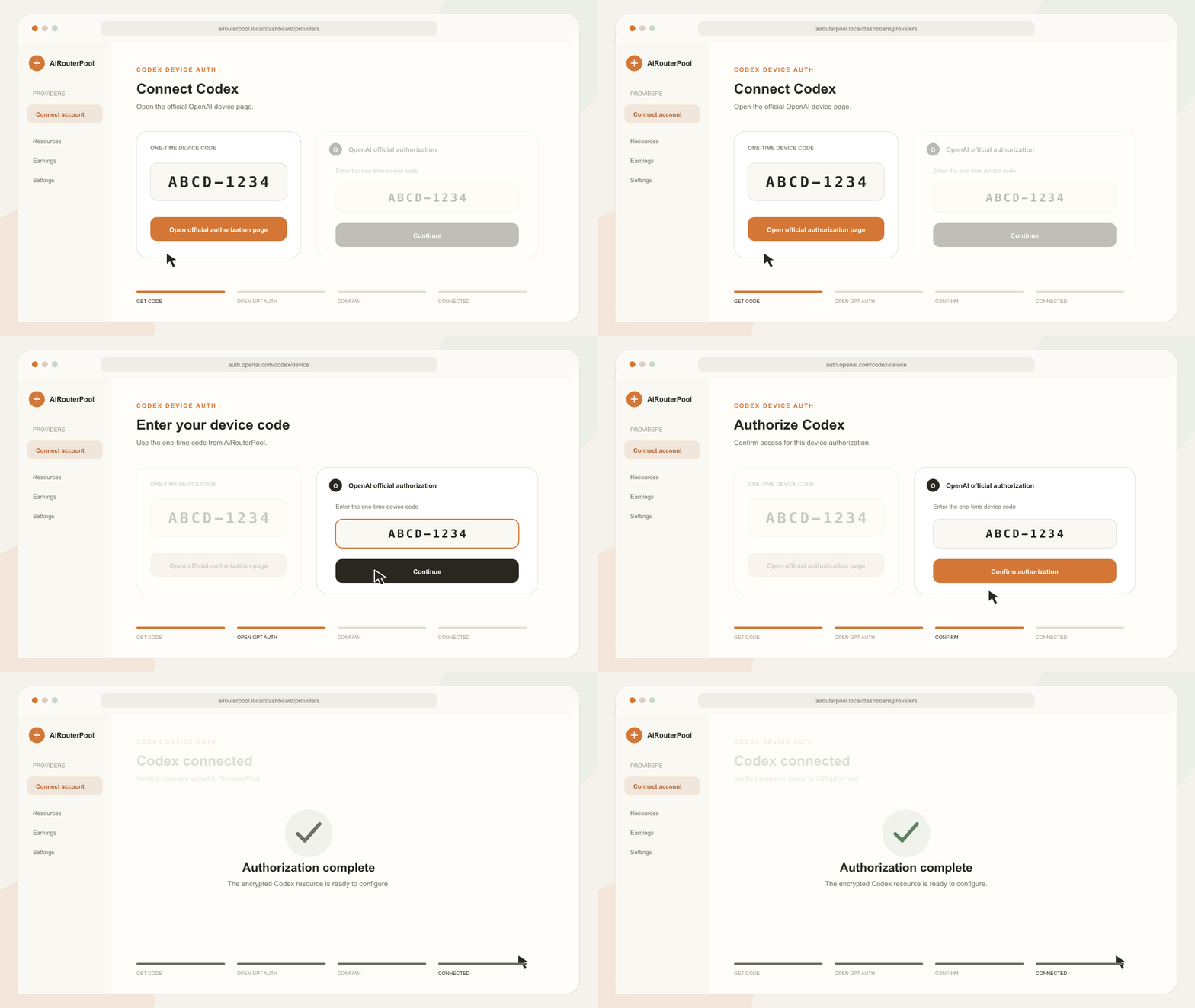
Choose Connect Codex in Providers
Open Dashboard → Connect accounts and choose Codex. The platform requests a one-time Device Code from OpenAI.
Copy the one-time device code
The code is valid only for this authorization. Generate a new one if it expires.
Open the official OpenAI page
Open auth.openai.com/codex/device and sign in to the ChatGPT or Codex account you want to provide.
Enter the code and confirm
Check that the host is auth.openai.com before entering and confirming the code.
Keep the dashboard open
The page polls until the resource is created; then configure models, concurrency, and availability.
04 / Automatic payout
Withdraw provider earnings in Base USDC
Successful request earnings become withdrawable immediately. Once the minimum shown in the dashboard is reached, submit a withdrawal. The system automatically queues, broadcasts, and confirms the Base USDC transfer; normal arrival is usually 1–3 minutes.
01
Earn
Successful routed requests create pending provider earnings.
02
Settle
After the hold period and ledger checks, earnings become available.
03
Withdraw
Choose an amount up to the available balance and confirm the bound address.
04
Receive
The backend pays official Base USDC from a limited hot wallet and tracks confirmations.
What each payout status means
Queued
Waiting for the automatic worker, daily limit, or wallet funding.
Paying
The signed transaction is being broadcast.
Confirming
The transfer is on-chain and waiting for confirmations.
Completed
The exact USDC transfer has been verified on-chain.
05 / Security
Account and payout safety
Account authorization and payout addresses control valuable access or funds. Treat every confirmation as a security-sensitive action.
- Authorize only on the official provider domain.
- Never share OAuth tokens, device codes, session cookies, or private keys.
- Check the full Base address before binding or changing it.
- Use a wallet that supports native USDC on Base.
- Pause a resource immediately if its account health looks abnormal.